TextureAdvectionParticle Node
No description available
Category
Texture
Inputs
| Name | Type | Description |
|---|---|---|
| advection_mask | VirtualArray | No description |
| elevation | VirtualArray | No description |
| input | VirtualTexture | No description |
| mask | VirtualArray | No description |
Outputs
| Name | Type | Description |
|---|---|---|
| texture | VirtualTexture | No description |
Parameters
| Name | Type | Description |
|---|---|---|
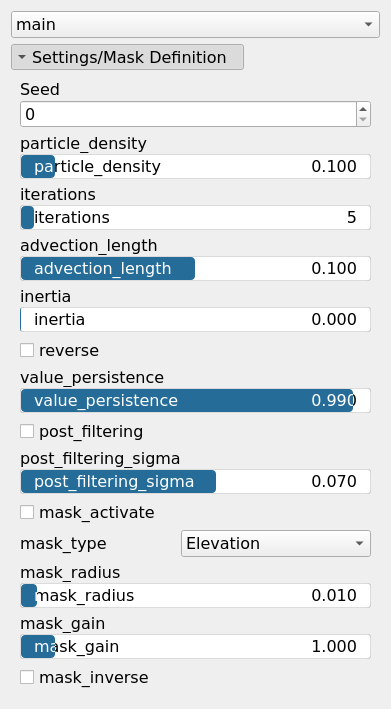
| advection_length | Float | No description |
| inertia | Float | No description |
| iterations | Integer | No description |
| Activate Default Mask | Bool | Enables or disables the internal mask. If the node's 'mask' input is connected, this setting is bypassed and the input mask is used instead. |
| Mask Gain | Float | Controls the intensity or influence of the internal mask. Bypassed if the 'mask' input is connected. |
| Inverse Mask | Bool | Inverts the internal mask, applying the operator where the mask is low. Ignored if a 'mask' input is provided. |
| Mask Radius | Float | Defines the smoothing radius for the internal mask. A value of 0 disables smoothing. This is bypassed if the 'mask' input is used. |
| Mask Type | Choice | Specifies how the internal mask is computed: 'Elevation' uses height, 'Gradient Norm' uses slope, and 'Elevation mid-range' selects the middle portion of the height range. This parameter is ignored when a 'mask' input is connected. |
| particle_density | Float | No description |
| post_filtering | Bool | No description |
| post_filtering_sigma | Float | No description |
| reverse | Bool | No description |
| Seed | Random seed number | Random seed number. The random seed is an offset to the randomized process. A different seed will produce a new result. |
| value_persistence | Float | No description |
Example
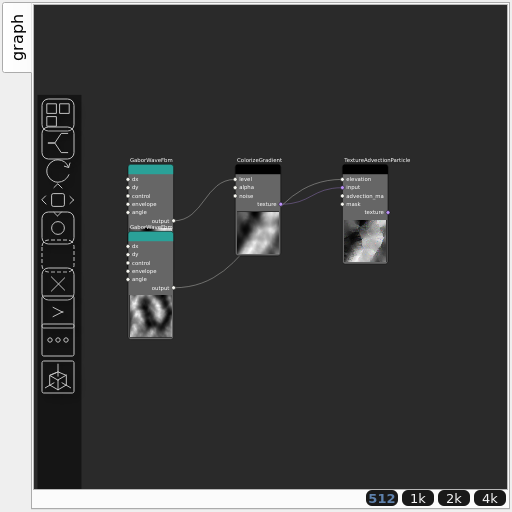
Corresponding Hesiod file: TextureAdvectionParticle.hsd. Use [Ctrl+I] in the node editor to import a hsd file within your current project.
Note
Example files are kept up-to-date with the latest version of Hesiod. If you find an error, please open an issue.